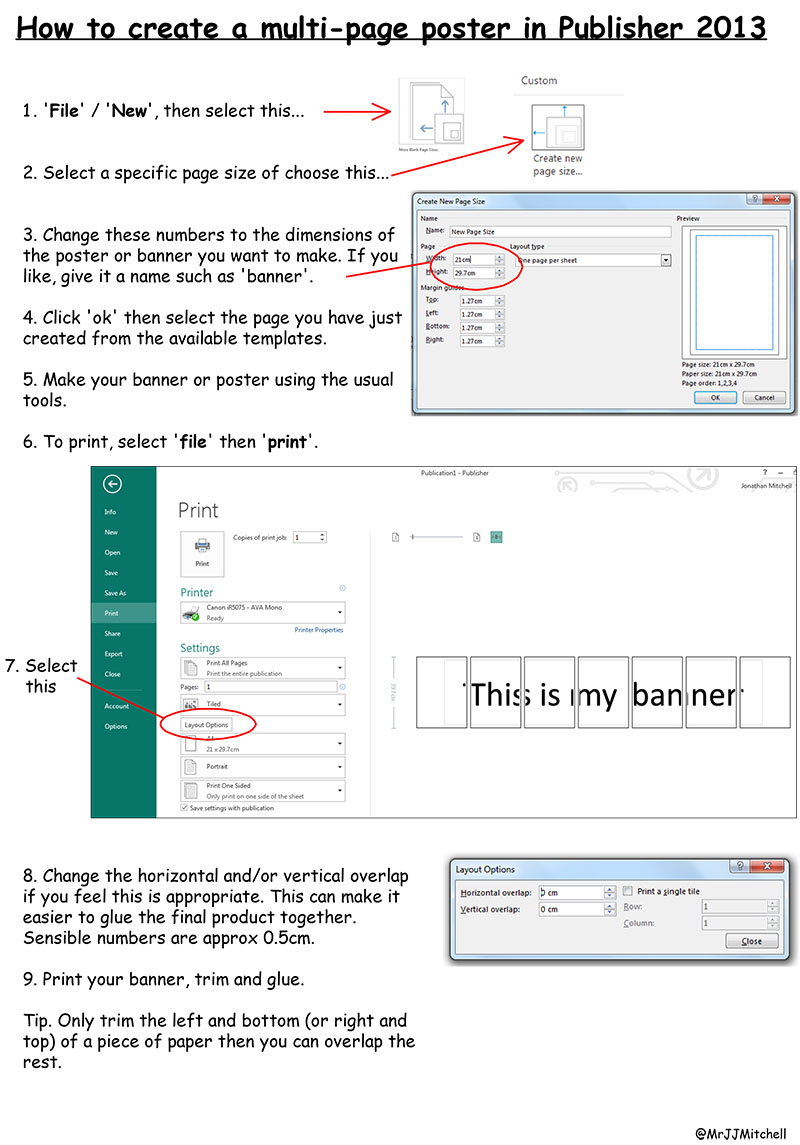
This is one of those things which can be really useful when working in a school – particularly if you can only print onto A4 or A3. I usually use good old Textease, to be honest, which makes the process extremely simple but, for those who use Microsoft Publisher, I’ve produced a little crib sheet…
Comments 5
Thx a lot for the Tutorial! Good work. As for me, last step (printing) i was making with the support of poster software, … Result was really cool! Thanks you again ! :)))
THANK YOU VERY MUCH!! This was very helpful, I’m soooo glad
How do you get it so that it starts printing at the very left margin so that your banner ends up on two pages instead of 3 with 1 less join??? I have tried everything but am struggling! Eg i design a poster which is 2 A4 landscape to landscape short edge but it always ends up centering it across three pages instead of making full use of the 2 pages.
My solution to printing a poster onto two pages instead of three was to print to pdf, then print the pdf as a poster with tile scale set to 99%. Hope this works for you!
An alternative easy to use tool to print a large picture or banner on multiple pages is Coragi ImagePrint: https://www.coragi.com/imageprint/